
Buying a used car
Car specs by reg: how to check a car's full specification
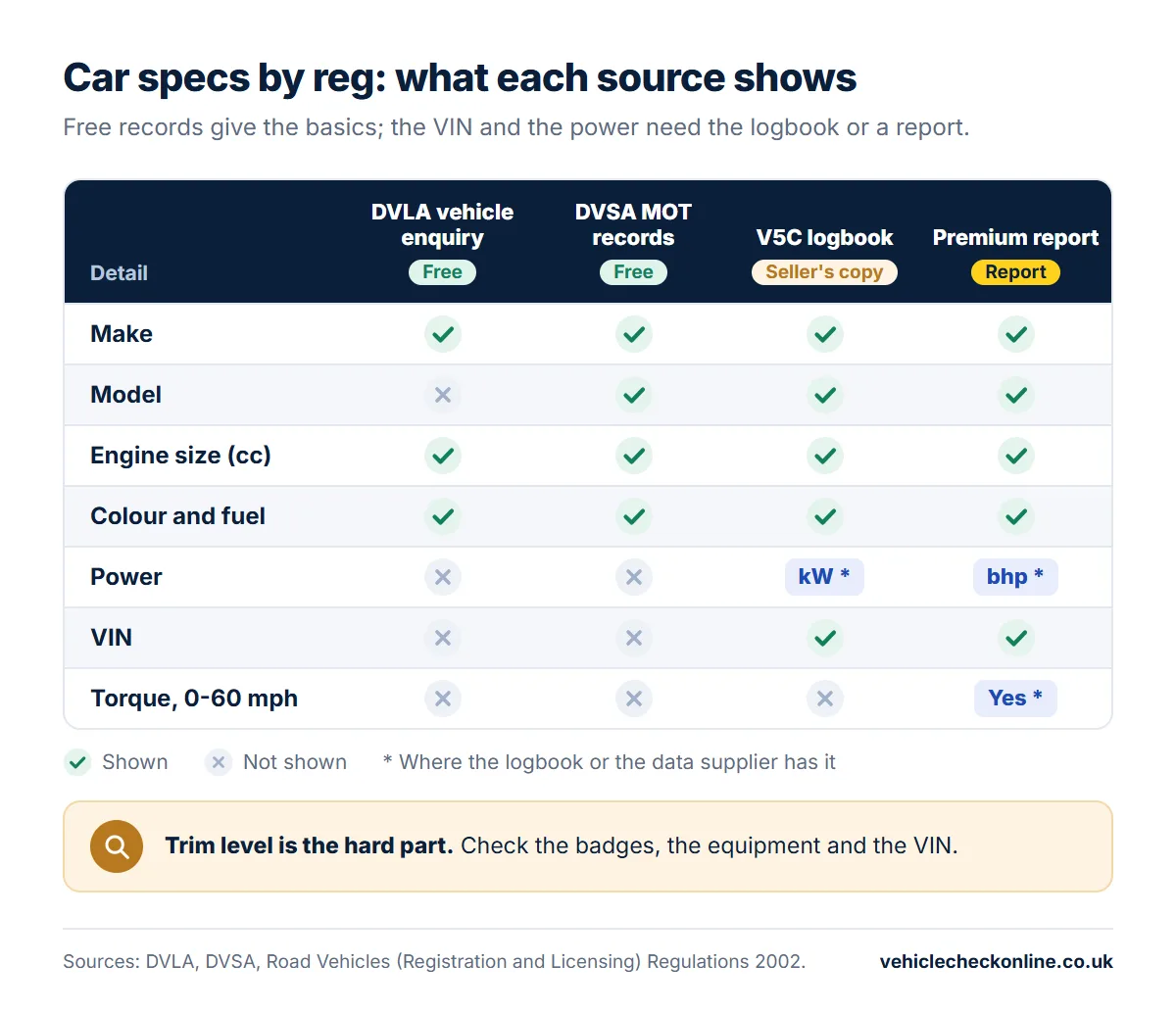
You can check a car's specs by reg for free, but only the basics. The DVLA's vehicle enquiry on GOV.UK gives the make, engine size, fuel type and CO2 emissions, and the MOT history adds the model. Neither gives the power, the dimensions, the trim level or the VIN: for those you need the V5C logbook, a report with the car's specifications, and a look at the car itself.
This guide sets out what each source shows and what is free here, how to check a car's model and engine size by registration, what a full specification report adds, and why the trim level is the hard part.
Car spec check: what is free and what needs a report?
No single free page gives a car's full specification. The free records come from two government databases, the DVLA's vehicle register and the DVSA's MOT records, and they cover the basics. Performance, size and weight figures come from vehicle specification data, which needs a paid report.
| Specification | Free: GOV.UK or our free car page | Premium report |
|---|---|---|
| Make, model, colour and fuel type | Yes | Yes |
| Engine size (cc), year of manufacture, first registration | Yes | Yes |
| CO2 emissions, Euro status, type approval category | Yes, when the DVLA holds them | Yes, when the DVLA holds them |
| Power, torque, 0-60 mph and top speed | No | When the data is available |
| Fuel economy, gearbox, cylinders, driven wheels | No | When the data is available |
| Body, seats, dimensions, kerb weight, fuel tank | No | When the data is available |
| VIN and engine number | No: they are on the V5C | When the data is available |
| Trim level and options fitted | No | No: check the car and its paperwork |
The free records are enough to confirm that a car is the make, model and engine you were told. To compare performance, running costs or size, or to check the VIN without the logbook, you need the report or the maker's figures for that version.
How do you check a car model by reg: DVLA or MOT history?
All you need for the DVLA's free vehicle enquiry on GOV.UK is the number plate. It lists details the DVLA holds, such as the make, colour, engine size, fuel type, CO2 emissions, Euro status, year of manufacture and date of first registration, with the tax and MOT status.
It does not show the model. The DVLA's own description of the data behind the service has a field for the make, but none for the model, the VIN or the power.
For the model, use the MOT history, also free on GOV.UK. The DVSA's MOT records hold the make and model, the colour, the fuel type and the engine size, alongside the result and mileage of every test.
Our free car page shows the MOT side of it: make, model, colour, fuel, engine size, year of manufacture and the date of first registration, with the MOT status, any open safety recall and every MOT test. You can open it from our free MOT history page; the CO2, Euro status and tax status are on GOV.UK's enquiry.
How do you check a car's engine size?
Engine size is the cylinder capacity, measured in cubic centimetres (cc). You will find it in the DVLA's vehicle enquiry, in the MOT records, in our free check and on the V5C logbook, in the box coded P.1.
An advert may give the size in litres instead. To compare the two, divide the cc figure by 1,000 and round to one decimal place: 1,598 cc is a 1.6-litre engine, and 1,995 cc is a 2.0.
The cc figure does not tell you how powerful the engine is. For that, read the power on the logbook: our guide to the bhp check explains where it is and how to convert it from kW.
GOV.UK lists a new engine and a change of cylinder capacity among the changes a keeper must put on the V5C. If the engine sizes in the advert, on the record and on the logbook do not agree, ask the seller why before you go any further.
What extra specs does the V5C logbook show?
The V5C holds more of the car's details than either online service, but you need the document itself, so ask the seller to show it. The law sets what a logbook must contain, including the make, type and model, the cylinder capacity, the type approval number, the VIN, the engine number, the fuel type and the number of seats.
The DVLA's guide to registering a new vehicle asks for the model "including full vehicle specification", so the model on a logbook may name the version as well as the model.
The colour is a basic description, not the maker's paint name: the DVLA's own example is a lavender car recorded as purple. A slightly different shade is normal. A different colour altogether should have been recorded on the logbook, because a colour change is one the keeper must report.
The power, where the logbook has it, is in the box coded P.2, in kilowatts.
What does a car specification report by registration show?
The free sources stop at the basics. A report built from vehicle specification data adds the performance and technical details. The Premium report (£7.99) includes a Specifications card, when the data is available for the car, with:
- the power in bhp, the torque, the top speed and the 0-60 mph time
- the combined fuel economy in mpg, the CO2 emissions and the Euro status
- the gearbox, the driven wheels, the number of cylinders and the aspiration (for example, turbocharged)
- the body type, seats, length, width, height, kerb weight and fuel tank size in litres
- the road tax band and the 12-month road tax rate
It also gives the VIN and engine number on record, to compare with the car and the logbook, with the number of logbooks issued and any colour changes, alongside the finance, write-off, stolen, keeper and mileage checks of a car history check.
A report does not name the trim level, list the options fitted or give the insurance group. Its figures are those of that version of the car, not measurements of the car in front of you.
How do you find a car's trim level?
The trim level is the version within a model range, and it decides much of the equipment. None of the free records names it reliably, so build the answer from several clues:
- The badges. A quick clue, but badges can be fitted or removed, so do not rely on them alone.
- The equipment. Compare the wheels, seats, lights and screens with the maker's specification for that version and year.
- The V5C. The model description may include the version, as explained above.
- The VIN. Our free VIN decoder reads the manufacturer, the region and the possible model years. It does not decode the trim.
- A franchised dealer. Ask a dealer for the make whether it can tell you the car's original specification from the VIN.
- The paperwork. The original order or sales invoice, if the seller still has it, should show the version and any options.
Our guide to the VIN number check explains what each part of a VIN can and cannot tell you.
Why do the specs matter for insurance, price and cloned cars?
- Insurance. Insurers use Thatcham Research's group ratings to help judge a car's risk. The rating reflects the price when new, which varies with the trim level, and the car's performance, so two versions of the same model can be rated differently. Get your quote for the exact version, and give your insurer accurate details.
- Price. Two cars with the same model name can be different versions. Compare the asking price with cars of the same version, not just the same model.
- Cloned cars. A cloned car wears the identity of a genuine car, so the record you check describes that other car. Make sure the make, model, colour, engine size and fuel type on the record match the car in front of you, and that the VIN and engine number on the car match the logbook.
Our guide on how to tell if a car is cloned goes through the identity checks in order.
If the model, colour, engine size or fuel type on the record does not match the car, do not buy until the seller can explain it with paperwork.
Questions and answers
Is there a free car spec check by reg?
Yes, for the basics. GOV.UK's vehicle enquiry shows the make, colour, fuel type, engine size, CO2 emissions and Euro status, and the MOT history (on GOV.UK or our free car page) adds the model. The power, performance, dimensions and VIN need the logbook or a paid report.
Can I find a car's model from its number plate?
Yes, for free. The MOT history on GOV.UK gives the make and model. The DVLA's vehicle enquiry service gives the make, engine size and other details, but not the model.
How many litres does my car hold?
It depends which litres you mean. The engine size in litres is the cc figure divided by 1,000, so 1,598 cc is a 1.6-litre engine. The fuel tank's capacity is not in the free records: the owner's handbook usually gives it, and the Premium report includes it when the data is available.
How do I check a vehicle specification by VIN number?
A free VIN decoder reads the manufacturer, the region and the possible model years, not the trim or the equipment. For the original build, ask a franchised dealer for the make whether it can look the VIN up. By registration, the Premium report gives the VIN on record with the car's specifications when the data is available.
Does the V5C show the trim level?
Not reliably. The logbook records the make, type and model, and the model description may name the version. Check the badges and the equipment too, and ask a franchised dealer if you need certainty.
Which details should match before I buy?
The make, model, colour, engine size and fuel type should be the same on the car, the V5C and the official record, and the VIN on the car should match the logbook. A mismatch needs an explanation and paperwork before you pay.
Does the trim level affect insurance?
It can. Thatcham Research's group ratings, which insurers use, reflect the price when new, which varies with trim, and the car's performance. Get a quote for the exact version before you buy.
Sources
- GOV.UK: Get vehicle information from DVLA (what the free vehicle enquiry shows)
- DVLA: Vehicle Enquiry Service API, the vehicle details it returns
- DVSA: MOT history data formats (vehicle make, model and engine size)
- legislation.gov.uk: Road Vehicles (Registration and Licensing) Regulations 2002, regulation 10A
- GOV.UK: Apply for first vehicle tax and registration of a new motor vehicle (V55/4, with the V355/4 guide)
- Thatcham Research: Group Rating
Related guides
- BHP check: how to find out how much horsepower a car hasBHP check: find your car's power free in box P.2 of the V5C, turn kW or PS into bhp, or get bhp, torque and 0-60 by reg. Why GOV.UK does not show it.
- VIN number check in the UK: what a VIN can and cannot tell youVIN number check in the UK: what a free VIN check shows, why history checks use the reg, how to find the VIN from a registration plate, and how to read it.
- How to tell if a car is cloned before you buy itHow to tell if a car is cloned: match the VIN, the V5C logbook and the official record, and meet at the keeper's address. Step-by-step checks for buyers.
- How to tell if a car is importedHow to tell if a car is imported: the logbook dates, MOT history, VIN and clues on the car, and what an import means for history checks, insurance and ULEZ.
- Find a car owner by registration number: what the law allowsCan you find a car owner by registration number? Not from any public lookup. When the DVLA releases keeper details on form V888, and what to do instead.
This guide is general information for people buying, owning or selling a car in the UK, not legal or financial advice. Vehicle Check Online is an independent service, not affiliated with the DVLA, the DVSA or GOV.UK.